
Introduction
Innoactive is an enterprise XR platform used by organizations to manage, distribute, and access immersive training applications across devices and locations.
To support customers who are already using Innoactive as part of their XR ecosystem, SynergyXR offers an integration that allows content created in SynergyXR to be used alongside existing Innoactive workflows. This makes it possible to continue using Innoactive for deployment and distribution, while benefiting from SynergyXR’s tools for creating and managing immersive trainings.
The integration is designed to fit into existing setups without requiring changes to current deployment strategies, giving organizations flexibility in how they build and deliver XR content.
If you want to learn more about the Innoactive platform, please refer to the Innoactive Knowledge Base.
How the integration works.
From the SynergyXR side, the integration focuses on preparing and configuring your content so it can be accessed and launched through Innoactive.
In practice, this means that trainings created in SynergyXR can be linked and made available within your Innoactive environment. The setup involves configuring the necessary connection details and ensuring that your SynergyXR content is properly structured for external access.
The following sections will guide you through how to set up and configure this integration within SynergyXR.
First of all, in the Innoactive platform, you need to create the specific SynergyXR training app. you want to assign user to.
(Look for Innoactive documentation if support is needed for creating training app. within Innoactive)
One of the last steps of setting up this app. in Innoactive is to add the specific launch arguments from SynergyXR to the app.
To find these launch arguments you need to go to the SynergyXR Manager and locate the training space you want to make accessible through the Innoactive training app. you have just created.
In the SynergyXR Manager, find the "Spaces" tab and locate the training space of your choice.
Make sure to tag the space as a "Trainingspace" and now click the "Innoactive"button: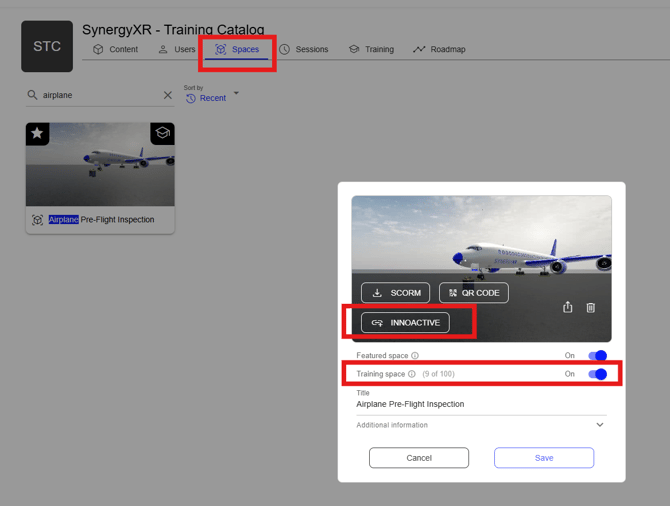
You have two options for creating the launch arguments.
- One option that will make the user login manually to the SynergyXR training.
- One option that launches the SynergyXR app. automatically, logs the user in automatically and launches the relevant training automatically.
In this case we are going with the more automated option.
Type in the user credentials. We recommend a generic user that has been created with a "Viewer" role.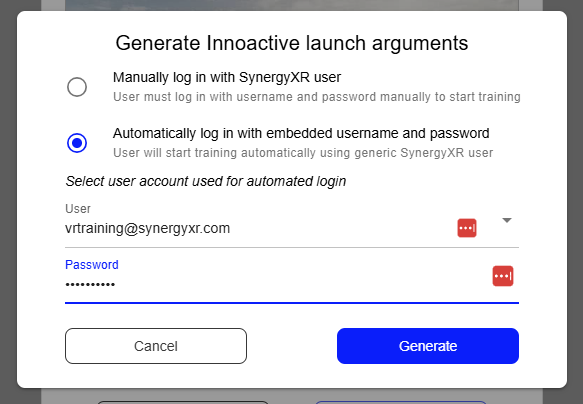
Now click the "Generate" button and it will generate the launch arguments for you, ready to be copied to the clip board:
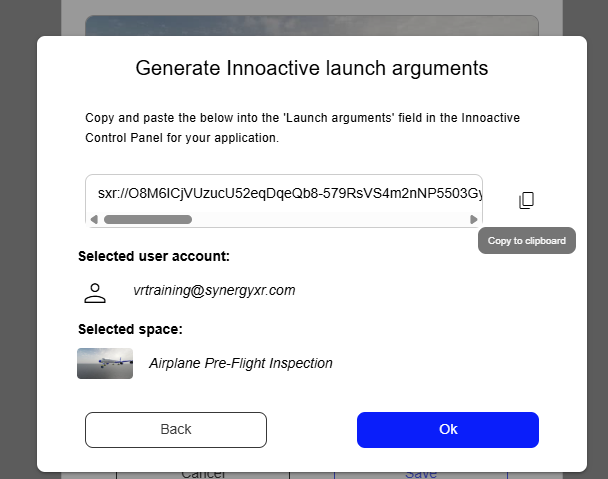
Now paste in the launch arguments to the training app. you have created in Innoactive and you are ready to assign users to the training application.